bunrun: A Simple Launcher with AI-Assisted Setup
Vibe coding has left me with quite a few small development apps. Starting any one of them is easy, but first I need to remember where it lives, whether it uses Bun, npm, uv or something else, and which command starts it. Doing this for a dozen projects started to get a bit old.
So I made bunrun, a local dashboard for starting, stopping and watching development apps:
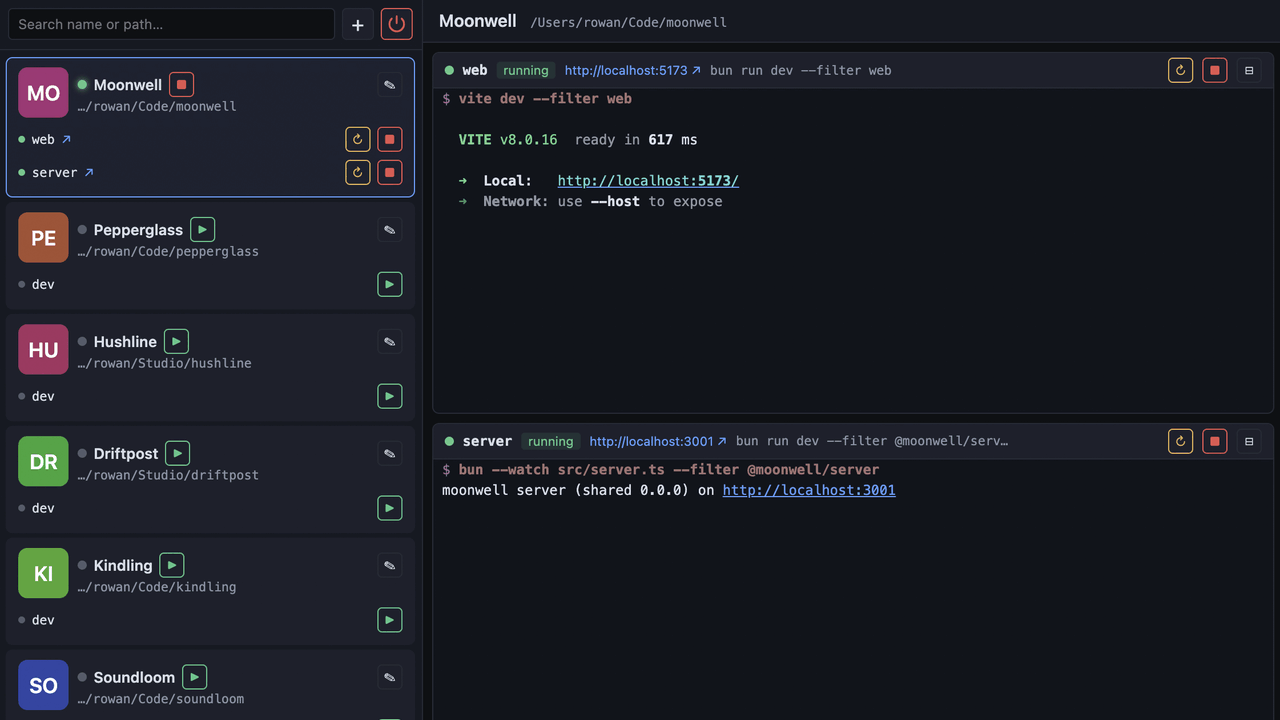
It is intentionally quite simple. A project is just a path and one or more shell commands. bunrun starts them as child processes, shows their output with ANSI colors, detects URLs from the output and can open the app in a browser. When bunrun exits, the child processes exit too — no containers, daemons or process archaeology required.
Let AI Do the Discovery
The annoying part of a launcher is not launching things, but configuring them. My projects use different package managers, commands, ports and favicon locations. I could keep adding discovery heuristics to bunrun, but coding agents are already rather good at inspecting projects.
For this reason the repository includes a SKILL.md that teaches an agent how
to register projects. After cloning bunrun, I can ask Codex or Claude Code:
Use SKILL.md to discover/register my projects for bunrun.
Scan ~/koodi with max depth 1.
The agent checks things such as package.json, pyproject.toml, lockfiles,
development scripts, .env files and favicons, then writes the results to
data/projects.yaml. On later scans it updates the discovered details while
preserving names, pins and other UI state I may have changed.
I like this division of work: the launcher stays predictable and boring, while AI handles the fuzzy discovery and setup step. Manual editing is still available both in YAML and through the dashboard.
Running bunrun
git clone https://github.com/jokkebk/bunrun.git
cd bunrun
bun install
bun run dev
I went from an initial plan, sketched with Claude Code or Codex (I can't remember which), to a working process manager and Svelte dashboard implementation in one afternoon, built largely with GLM 5.2 and opencode — a new tool in my arsenal. The discovery skill and a small .env editor followed the next morning. It is already handy enough that I can reach for the dashboard instead of running around in the terminal — which was the whole point.
Source and setup instructions: github.com/jokkebk/bunrun