AVR ATtiny USB Tutorial Part 2
This is the second part of my USB tutorial for ATtiny2313 and V-USB library. In the first part we learned how to get 3.3V from USB to power our circuits. In this part, we will expand our setup with following parts:
- Larger breadboard and additional jumper wires
- ATtiny2313
- 12 MHz crystal oscillator
- Two 27 pF ceramic capacitors to stabilize the crystal
- Two 68 Ω resistors between USB data lines and the microcontroller pins
- 1 MΩ pullup resistor for D+ and 1.5 kΩ pullup for D-
- 6-pin header for programming the ATtiny and 4.7 kΩ pullup for reset pin
Update: Some people have noted that the setup I’m using here runs ATtiny2313 at 12 MHz with only 3.3V VCC, which is outside the specified range (frequencies over 10 Mhz require 4.5V or more). I’ve never had any problems, and many others have succeeded with this setup, but if you encounter persistent problems, I suggest you to power the ATtiny2313 straight from 5V of the USB line and use zener diodes on D+ and D- lines to drop their voltage, as is done in my later tutorial with the ATtiny85 microcontroller.
Breadboard setup
This time I will not walk you through every connection. Instead, I’ll just outline the steps needed and show the pictures of end result. Here is the schematic we’re building:
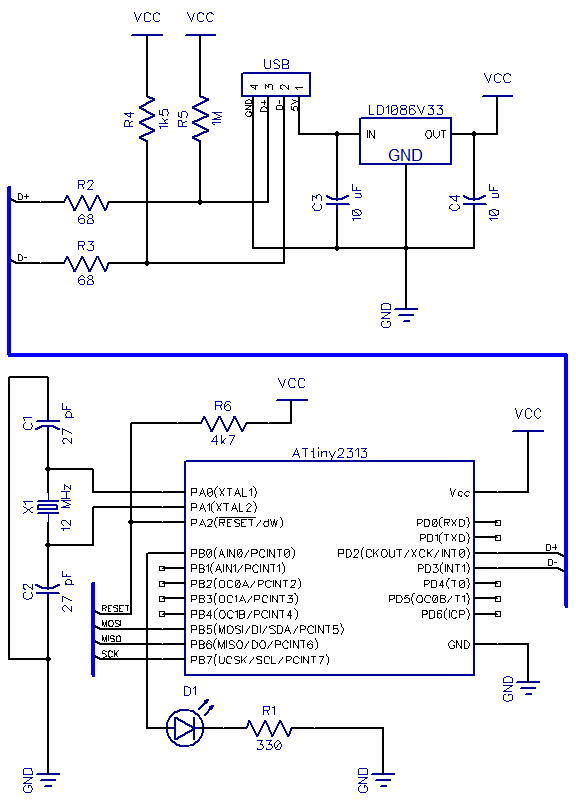
Basically it’s the regulator circuit we just built, pullups and line resistors for D+ and D- in the USB bus going to PD2 and PD3, and the ATtiny2313 with RESET pullup and MISO, MOSI, SCK and RESET connected to the 6-pin programming header, and a 12 MHz crystal. An easy order to make these connections is to:
- Reconstruct the power circuit from part 1 in one corner of the breadboard. Instead of connecting 5V from USB to the positive power rail, connect it straight to the input pin of the regulator – we won’t be needing 5V anywhere else
- Use jumper wires to connect regulator output and shared ground from USB to breadboard power rail
- If you have multiple power rails, you can use jumper wires to provide current to all of them
- Double-check the regulator pin connections and that capacitors are connected the right way
- Plug in the USB and use a multimeter to check you have 3.3V in power rails
- Insert the ATtiny and do standard wiring for power, reset pullup and 6-pin programming header
- If your programmer has a mode where it provides power to the chip – disable it
- Use programmer to check that the chip responds OK (i.e. gets power and acts in a stable manner)
- Connect the LED to PB0 and do a “test run” – flash a program that blinks the LED to see that it works
- Connect pullup resistors to D+ and D- (1M and 1k5)
- Connect D+ and D- to PD2 and PD3, respectively – use 68 ohm resistors in series here!
- Connect the 12 MHz crystal to PA1 and PA0, and ceramic capacitors between crystal pins and ground
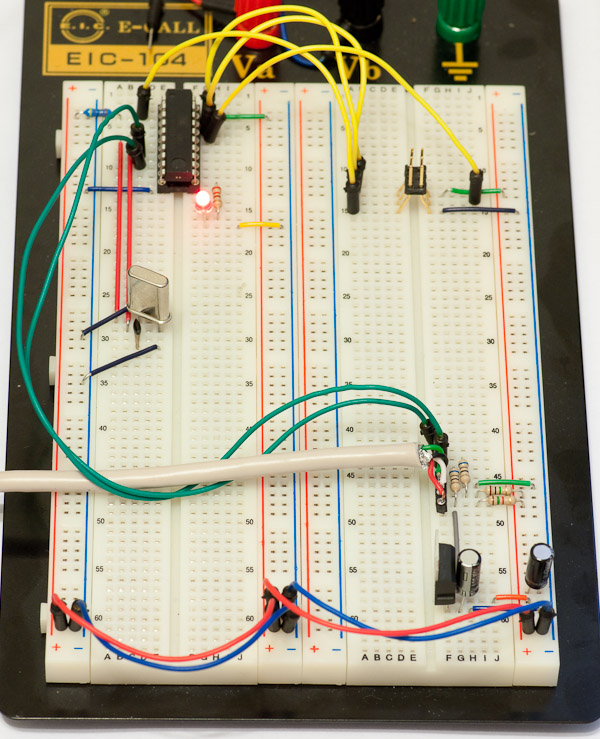
Here’s how the end result should look like:
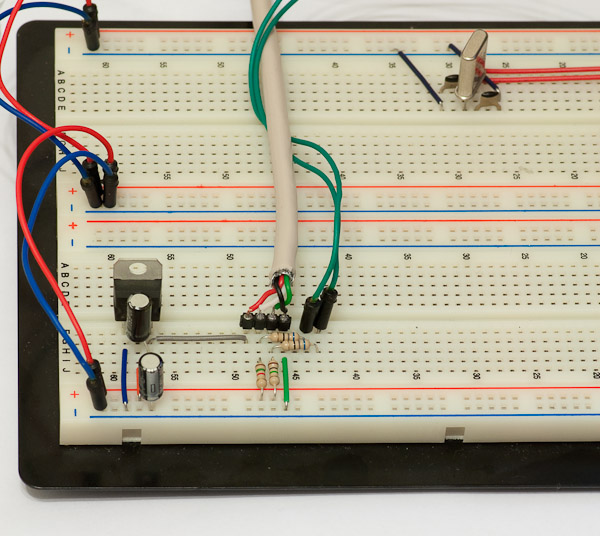
Here is another closeup of the power part and USB jumpers. Note how 5V from USB goes to regulator only and nowhere else.
By the way, if you need a refresher on how to connect the RESET pullup and 6-pin header and use the programmer, check out this excellent tutorial – wiring is the same but of course pin locations in ATtiny2313 are different than in ATtiny45. Connecting the crystal is also very easy, just connect the two legs of the crystal to PA0 and PA1, and add ceramic capacitors between each leg and ground (they need to be close to the crystal to make it stable).
Software side – preparing for V-USB
Now for the good stuff! If you did not already test that your ATtiny2313 setup is working, I suggest you to do that now. A good way to do it is to use the following simple test program:
#include

#define F_CPU 1000000UL  // 1 MHz
#include

int main() {
	DDRB |= 1; // LED on PB0

	while(1) {
		PORTB |= 1; // Turn LED on
		_delay_ms(500);
		PORTB &= ~1; // Turn LED off
		_delay_ms(500);
	}

	return 1;
}
This test program has the great additional feature that once we update the fuse bits for 12 MHz clock, it’s easy to verify that blink gets 12x faster. Now for ATtiny2313, we want to disable the internal clock/8 division and use an over 8 MHz clock with 14 clock cycles + 4.1 ms startup delay (CLKSEL=1111, SUT=10). This means that low fuse should be 0xEF, which is done using avrdude command “-U lfuse:w:0xef:m” (without quotes). In case you are using any other part or just want to check it yourself, use the excellent AVR Fuse Calculator.
Once you have updated the lfuse, reset or reprogram the chip to verify that the LED is now blinking 12 times per second. Update the blink example’s F_CPU to 12000000L and reflash to verify that the blinking returns to 1 Hz speed. Congratulations, everything is now ready for the V-USB -part of the tutorial! I will stop here for tonight, and post the third part of this tutorial shortly, covering the basic V-USB setup for our circuit.